
Tree maintenance — Marangaroo
Due in 6 days · W0170588
HighDrag to move
A job scheduler decides what work needs to happen, when it should happen, in what order, and who or what should do it.
What needs to happen
New jobs, requests, timed events, reminders, retries, and follow-up tasks arrive into one coordinated flow.
What should happen next
Priority, due times, dependencies, fairness, capacity, and business rules decide which work is released.
What actually happened
Waiting, running, completed, failed, cancelled, and retried work stays visible with a usable record behind it.
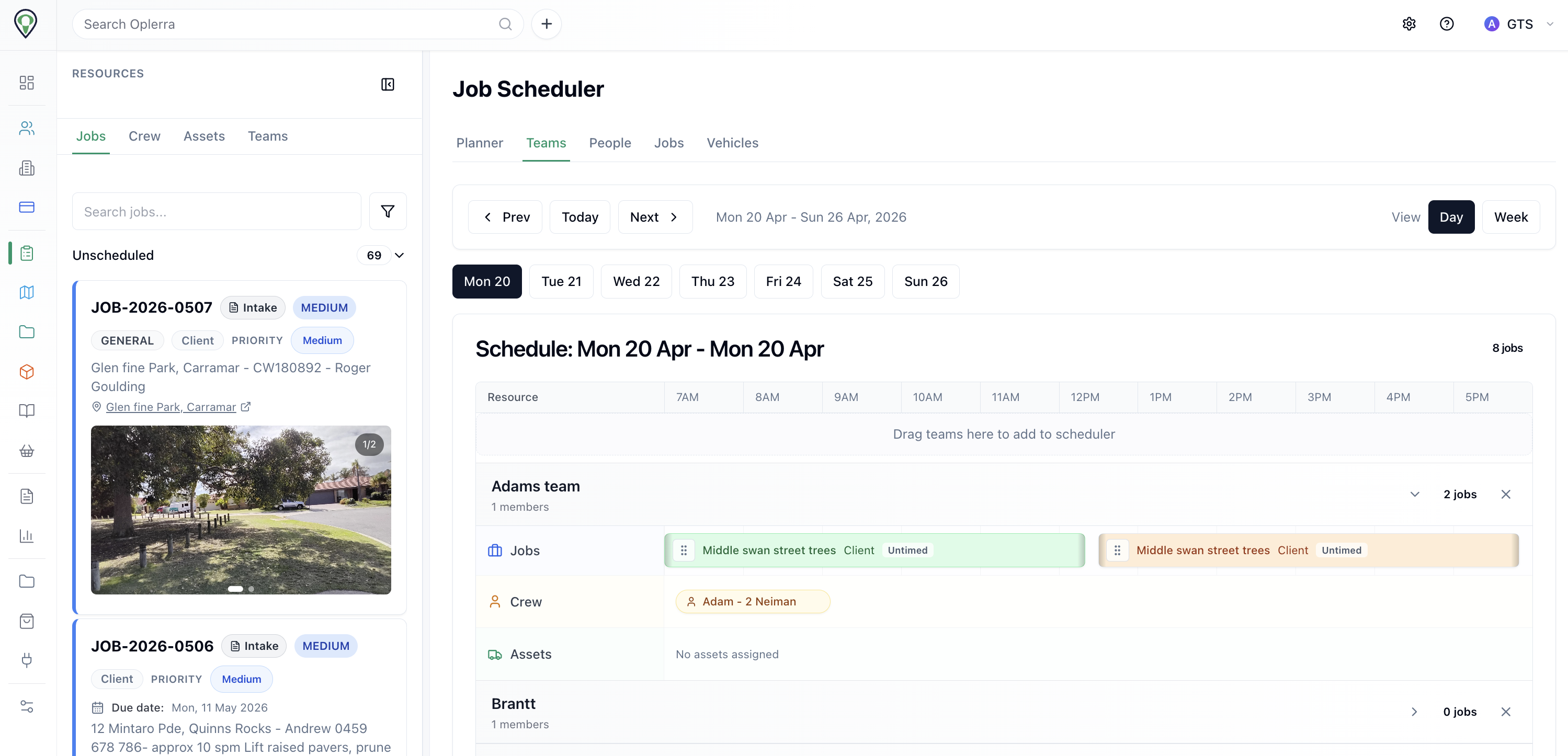
Job scheduler
Teams, jobs, crew assignments, and resource availability laid out across the week so nothing gets missed or double-booked.
Operations coordinator
A job scheduler is the part of the system that decides what work needs to happen, when it should happen, in what order, and who or what should do it.
The simplest way to think about it is as an operations coordinator. It sits between incoming work, the rules that govern release, the workers that do the job, and the state record that shows what happened next.
Incoming work from new jobs, requests, reminders, retries, and timed events
Rules and priorities that decide urgency, timing, dependencies, and limits
Workers or services that do the actual work once it is released
State tracking so teams can see what is waiting, running, completed, failed, or cancelled
Monitoring and alerts when work is stuck, slow, blocked, or broken
Incoming work
Jobs do not appear from one place only. Work can be raised by users, by time, by other processes, or by failure recovery.
user-created jobs and service requests
scheduled maintenance or recurring work
time-based reminders and follow-up actions
system-generated retries after failure
linked downstream work raised from completed jobs
Intake
New jobs awaiting triage.
Tree maintenance — Marangaroo
Due in 6 days · W0170588
Sign repair — Wanneroo
Unscheduled · W0170522
Delivery
Active field execution.
Prune reserve paths — Girrawheen
Crew assigned · 52 Berryana Loop
Park mowing — Bullsbrook
Assets: UTE-001, Mower-04
Post job
Wrap-up, inspections, sign-off.
Proof pack — Bullsbrook (<50km)
Evidence ready · 4h ago
Planner View
Replaced the fragile mock week columns with a real product screenshot so the page shows an actual scheduler instead of a broken illustration.
Teams visible
Crew, assets, and jobs on one board
Planned + reactive
Unscheduled work stays in the same flow
Asset context
Vehicles and plant remain visible while booking
Rules and priorities
Picking work up is not enough. The scheduler applies timing, urgency, dependencies, fairness, and capacity so the operation runs in a controlled order.
priority and urgency
due dates and time windows
dependencies and prerequisite checks
crew, asset, or worker capacity
fairness, throttling, and business limits
Release and assignment
A good scheduler does not just push work forward. It checks whether the next job can proceed, who should do it, and whether an exception needs to be recorded.
whether prerequisite work is already complete
whether the right crew, worker, or service is available
whether assets, permits, or documents are ready
whether the work should proceed now, later, or under an exception
whether failed work should retry, escalate, or wait
Adam Martelletti
Employee • Assigned to this job
Missing Western Power Induction (1 required, 0 valid)
Bob Williams
Employee • Assigned to this job
Meets all requirements
Job status
Blocked until all assigned crew meet competency requirements.
Calendar View
Switch between crews, assets, jobs, and unscheduled work.
Crew A
Crew view
Crew B
Crew view
Crew C
Crew view
State tracking and response
Once work is in motion, the scheduler keeps state visible and reacts when something needs retry, delay, escalation, or rescheduling.
Why this matters
Visibility is what turns scheduling from guesswork into control. Teams can see what is stuck, what is slow, what failed, and what should happen next instead of reconstructing the day afterward.
How it hangs together
The job is created, evaluated, released, executed, reported back, and then handled again based on the result.
A user action, system event, reminder, retry, or timed trigger creates work that needs coordination.
The scheduler reads timing, priority, fairness, dependencies, and readiness before it decides what to do next.
Jobs are assigned or released to the right crew, service, queue, or worker instead of being left waiting in the dark.
That work might be field execution, invoicing, reporting, syncing, notification, or record updates.
The system marks the job as completed, failed, cancelled, or in need of retry with the right context attached.
It can retry, delay, escalate, reschedule, or trigger the next linked task so the operation keeps moving.
What it connects to
It draws from operational truth, releases work in order, and records what changed so people can trust the flow later.
Stores jobs, status, timing, history, and the operational trail behind each decision.
Holds pending work so release is controlled rather than everything firing at once.
The crews, automations, or systems that actually perform the released work.
Trigger scheduled work, recurring tasks, delay windows, and retry timing.
Applies policy for what goes first, what must wait, and what is allowed to proceed.
Records what happened, when it happened, why it changed, and what caused the next action.
Alerts people or systems when work stalls, fails, breaches a rule, or needs attention.
Mental model
The scheduler is what coordinates the operation. It decides what should happen, but it is not the thing doing the job.
Scheduler = planner and coordinator
Queue = waiting line
Worker = person, crew, service, or machine doing the job
Database = source of truth and operational history
Rules = policy for what should happen first and under what conditions
Why schedulers matter
Stop work being forgotten or buried in a backlog.
Stop everything trying to run at once.
Make timing and release windows more predictable.
Handle retries and failures without losing control.
Keep work fair, visible, and traceable later.
Put timing, priority, readiness, retries, and operational visibility in one scheduler layer so jobs move in a controlled order with a traceable record behind them.