
Adam Martelletti
Employee • Assigned to this job
Not eligible
Missing Western Power Induction (1 required, 0 valid)
White CardFirst AidWestern Power Induction
Plan work, assign crews, record what actually happened on site, and keep every run, event, delay, and decision attached to the job.
Plan the work
Keep scope, scheduling, crews, assets, and field conditions connected from the start.
Record each run
Track real attendances, not just whether the job moved to another status.
Keep the history
Attach events, delays, overrides, and follow-up actions to the same operational record.
Supporting intro
It may be enough for administration. It is not enough to understand what actually happened in the field.
A crew might attend but be blocked from access. Work might be partially completed. A hazard might change the method. Weather might delay the run. Additional work might be identified on site.
If all of that gets compressed into a single status, the job record loses the truth.
Oplerra is built to run jobs with proper execution context, not just status labels.
Why traditional job tracking breaks down
In the real world, jobs are not clean state changes. They are made up of attendances, decisions, delays, risks, partial completions, and follow-up actions.
A status like Completed does not explain what the crew encountered, what changed on site, or what still needs to happen next.
What a single status does not tell you
whether the crew actually reached site
whether all work was performed
whether conditions changed
whether scope was deferred
whether follow-up work was raised
whether something was overridden to proceed
How Oplerra runs jobs
A job is the overall piece of work to be delivered. A run is a real unit of execution: a specific attendance, on a specific day, by a specific crew, with specific assets, under specific conditions.
One job may require more than one attendance. Instead of forcing that into one flat record, Oplerra keeps the job intact while allowing each run to carry its own execution history.
an initial attendance
a return visit
a follow-up action
a final inspection
Planner View
Replaced the fragile mock week columns with a real product screenshot so the page shows an actual scheduler instead of a broken illustration.
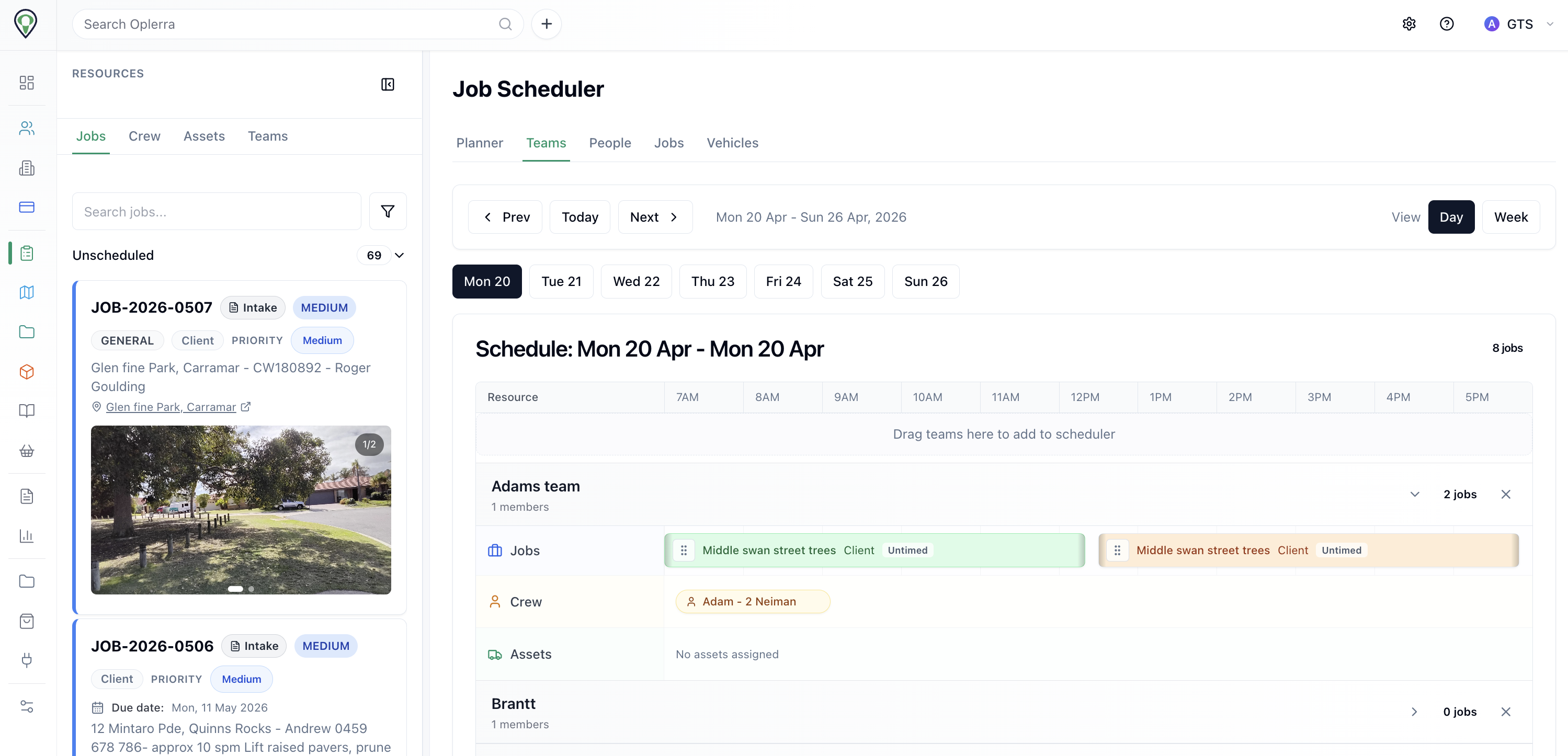
Teams visible
Crew, assets, and jobs on one board
Planned + reactive
Unscheduled work stays in the same flow
Asset context
Vehicles and plant remain visible while booking
Job Details
Rebuilt as a simpler static example that shows scope, release checks, and evidence without the broken card nesting from the old mockup.
Scope
Job W0170522 linked to the same site history, attachments, and follow-up decisions.
Contact
Jonathan Holder
Work type
Tree grinding and clean-up
Priority
Medium / public-facing site
Location
54 Church St, Wanneroo
Assigned crew
Crew A with chipper support
SWMS ready, competency confirmed, and evidence attachments kept on the same record so later review does not depend on memory or separate folders.
Record timeline
Inspection recorded
Defect notes and photos attached to the same tree record.
Safety released
SWMS, permits, and competency checks linked before scheduling.
Field work planned
Crew, date, and plant assignment saved on the operational record.
Proof retained
Outcome notes, attachments, and follow-up remain visible years later.
Why it matters
This example is deliberately flat and readable: one operational record, one evidence chain, and one timeline of decisions that still holds together after the job is done.
Events, not just outcomes
A job does not jump from scheduled to complete. Real execution unfolds through events, and the job record should reflect what happened instead of being rewritten afterward.
crew dispatched
crew arrived
access unavailable
hazard identified
work paused
partial work completed
additional work recommended
run completed
follow-up required
Checked before work begins
Oplerra can check whether the work is ready to proceed before the run starts, so supervisors catch issues before the day unravels.
crew competencies and expiry status
asset readiness and inspection status
permits or documents required for the work
location-specific conditions or requirements
other operational rules tied to the run
When an exception is needed
The decision can be explicitly recorded with context, justification, and accountability instead of being hidden in a call or comment trail.
Adam Martelletti
Employee • Assigned to this job
Missing Western Power Induction (1 required, 0 valid)
Bob Williams
Employee • Assigned to this job
Meets all requirements
Job status
Blocked until all assigned crew meet competency requirements.
Execution timeline
Execution is not just one timestamp. It is the chain around the work: what was planned, what was expected, what actually happened, and what changed.
when it was planned
when it was expected to occur
when it actually happened
what changed along the way
This matters when runs are delayed, rescheduled, split across days, or affected by field conditions. Instead of losing that detail in comments, calls, or memory, the timeline stays attached to the operational record.
Calendar View
Switch between crews, assets, jobs, and unscheduled work.
Crew A
Crew view
Crew B
Crew view
Crew C
Crew view
What this gives your team
When someone asks what happened on a job, the answer should be in the record.
Supervisors
Operations
Evidence
Designed for real field work
Execution rarely follows a perfect script. Oplerra keeps the job connected to the runs and events that actually moved it forward, which makes it easier to coordinate the day, manage exceptions, and keep a record that holds up later.
Coordinate the day with a clearer picture of active runs, blocked work, and follow-up requirements.
Manage exceptions without losing the reason, the decision, or the person who approved it.
Maintain a record that is usable later for clients, councils, managers, and internal review.
Move beyond status-only job tracking and give your team a clearer record of what actually happened in the field.