
Tree maintenance — Marangaroo
Due in 6 days · W0170588
HighDrag to move
Plan the work, assign the right crew and assets, stop unsafe dispatches, and keep the proof on the same record from first request to close-out.
Dispatch with context
Jobs, crews, assets, sites, and constraints stay in one operational view.
Block risky work
Competency, asset suitability, and safety requirements are checked before assignment.
Prove what happened
Evidence, signatures, notes, and status changes stay attached to the job record.
Work as it is
Oplerra treats each job as a live operational record: who is going, what is required, which assets are involved, what changed on site, and what evidence proves the work was done.
From intake to triage
Operations teams need to sort, prioritise, and assign work fast without losing the context that matters later. The board keeps urgency, categories, ownership, and safety signals visible from the start.
Why it works
Instead of pushing requests through a flat list, teams can work in stages, bulk-manage work, and move jobs forward with the next operational action clearly visible.
Intake
New jobs awaiting triage.
Tree maintenance — Marangaroo
Due in 6 days · W0170588
Sign repair — Wanneroo
Unscheduled · W0170522
Delivery
Active field execution.
Prune reserve paths — Girrawheen
Crew assigned · 52 Berryana Loop
Park mowing — Bullsbrook
Assets: UTE-001, Mower-04
Post job
Wrap-up, inspections, sign-off.
Proof pack — Bullsbrook (<50km)
Evidence ready · 4h ago
Schedule with clarity
Planner and calendar views give supervisors a visual control layer for crews, assets, overlaps, and unscheduled work.
Planner view
Availability, workload, leave, maintenance state, and compliance signals stay in the scheduling view so teams can make decisions before the wrong booking is locked in.
Calendar view
Switch between people, crews, jobs, assets, and unscheduled work to keep the whole operation moving without hidden conflicts.
Planner View
Replaced the fragile mock week columns with a real product screenshot so the page shows an actual scheduler instead of a broken illustration.
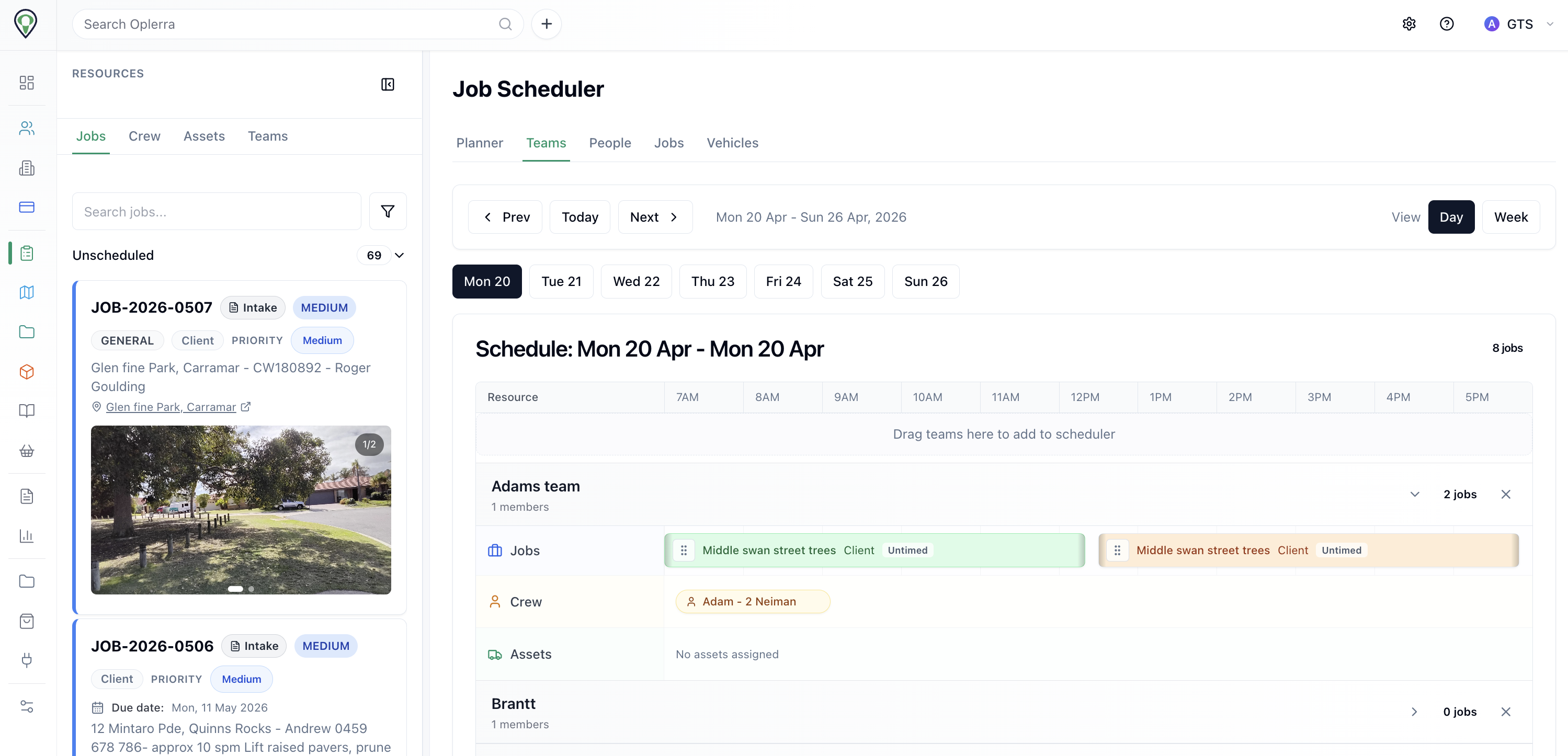
Teams visible
Crew, assets, and jobs on one board
Planned + reactive
Unscheduled work stays in the same flow
Asset context
Vehicles and plant remain visible while booking
Calendar View
Switch between crews, assets, jobs, and unscheduled work.
Crew A
Crew view
Crew B
Crew view
Crew C
Crew view
One control record
Scope, resources, safety, location, evidence, and commercial context should not be split across five tools.
Client, location, project, priority, category, and work requirements stay attached from first intake.
Crew, vehicles, and equipment are assigned with suitability and availability visible first.
SWMS, pre-starts, inductions, and competency rules travel with the work instead of living elsewhere.
Photos, forms, notes, signatures, and close-out proof are stored on the same operational record.
Job Details
Rebuilt as a simpler static example that shows scope, release checks, and evidence without the broken card nesting from the old mockup.
Scope
Job W0170522 linked to the same site history, attachments, and follow-up decisions.
Contact
Jonathan Holder
Work type
Tree grinding and clean-up
Priority
Medium / public-facing site
Location
54 Church St, Wanneroo
Assigned crew
Crew A with chipper support
SWMS ready, competency confirmed, and evidence attachments kept on the same record so later review does not depend on memory or separate folders.
Record timeline
Inspection recorded
Defect notes and photos attached to the same tree record.
Safety released
SWMS, permits, and competency checks linked before scheduling.
Field work planned
Crew, date, and plant assignment saved on the operational record.
Proof retained
Outcome notes, attachments, and follow-up remain visible years later.
Why it matters
This example is deliberately flat and readable: one operational record, one evidence chain, and one timeline of decisions that still holds together after the job is done.
Block unsafe work
Oplerra can surface blockers before dispatch, so supervisors do not have to discover them after the crew has already left.
Required certifications are missing or expired
Assigned assets are unavailable, unsafe, or under maintenance
Site-specific inductions or prerequisites are incomplete
Crew mix does not meet the work type or risk profile
Adam Martelletti
Employee • Assigned to this job
Missing Western Power Induction (1 required, 0 valid)
Bob Williams
Employee • Assigned to this job
Meets all requirements
Job status
Blocked until all assigned crew meet competency requirements.
Connected hierarchy
The work should not disappear once it leaves the board. Oplerra keeps the relationships between jobs, grouped work, project context, and contract-level reporting visible.
Operational result
Teams can see dependencies, track grouped scopes, and explain delivery at the level clients, councils, and internal managers actually ask about.
How it flows
The module is structured around the operating rhythm of field work, not around static task fields.
Sort incoming requests quickly without losing urgency, category, or operational detail.
Schedule crews and assets with availability, readiness, and constraints visible before commitment.
Capture what happened in the field while the job is live, not from memory afterward.
Roll jobs up into projects, programs, and contracts with a reconstructable delivery record.
Works with the platform
The strongest operational gains come from connecting jobs to the rest of the system instead of adding another standalone tool.
Tie equipment availability, service state, and suitability checks directly to job assignment.
Learn moreKnow who is qualified, inducted, and ready before they are put on the job.
Learn moreBring SWMS, inspections, and compliance evidence into the job instead of managing them separately.
Learn moreLink approved scope, pricing, and invoice readiness back to the work that was actually delivered.
Learn moreReplace disconnected scheduling, safety, and proof-of-work tools with one operational record that updates as the job moves.